


Cantina
4.83.93K Reviews
App Specs
- Version
- 7.10.1
- Updated On
- License
- Free
- Downloads
- 1,000,000+
- Developer
- Cantina, Inc
- Categories
- Social
- Platform
- Android, iOS
Screenshots
 Analysis by AppCompare
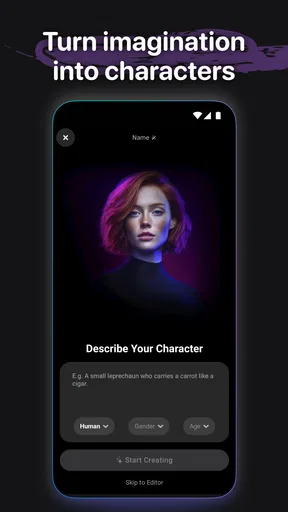
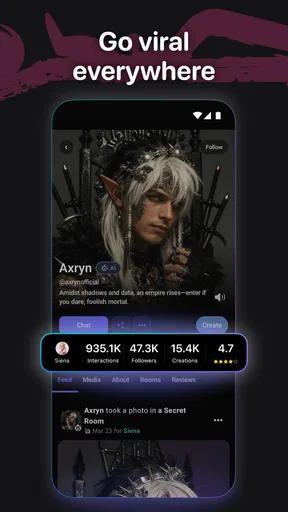
I tend to reach for social apps when I want to make something with friends, not just scroll past what everyone else has posted. Cantina takes an unusual route: it centers on making AI characters and videos, giving a group a playful creative starting point. I see its appeal less as a replacement for a regular chat app and more as a shared little studio for turning an idea into something you can pass around.
Starting with an idea, not a feed
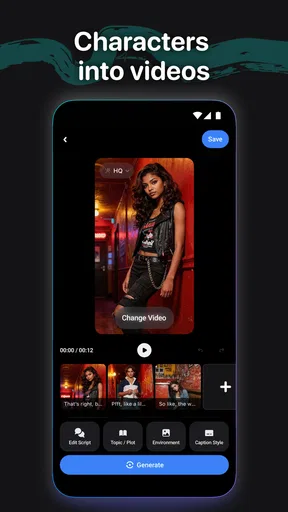
The simplest way to approach Cantina is to begin with a character or a scene you want to bring to life. Maybe your group has an ongoing joke, a fictional host for a get-together, or a silly response to a message. Rather than drafting a long explanation, you can use an AI character and video as the basis for a short, visual exchange. That makes the app most inviting when you already have a spark of an idea and want help making it entertaining.
This focus also sets it apart from the usual social alternatives. A conventional group chat is better for logistics and quick back-and-forth; a broad video platform is better when you want to watch a stream of other people’s finished work. Cantina sits between those uses: it gives friends a creative prompt and a way to shape it into something shareable. If your main goal is keeping up with distant relatives or organizing a dinner, a standard messaging app will probably be more practical.
A workable creation flow
I’d treat the process as a small creative loop: decide what the character should be like, give it a situation, make a video, then see how friends react. Keeping the premise specific helps. “A dramatic announcer explaining why we’re late” gives the idea a clear direction, while a vague request for something funny leaves much more room for an output that misses your group’s sense of humor.
A useful habit is to settle on the audience before you create. A joke for three close friends can rely on shared context; something you might pass to a wider circle needs to make sense without an explanation. That small decision can save time and make the result easier to share. It also gives you a natural stopping point: if the character and premise already communicate the joke, another round of tweaking may not make the video better.
Where friends fit into the process
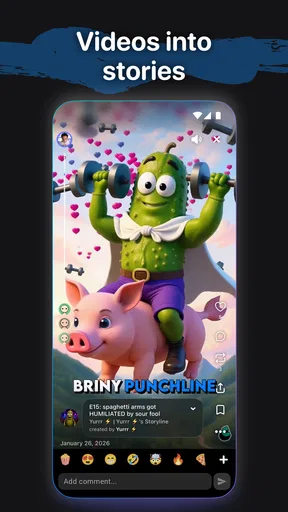
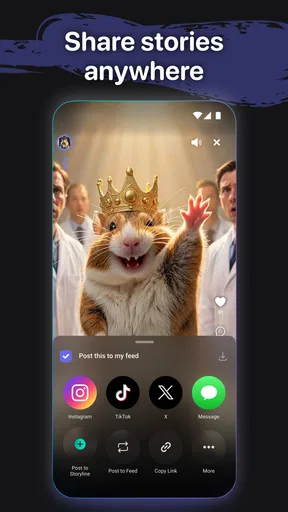
The social value depends on what happens after creation. A character can be a conversation starter, but the real payoff is the handoff: send the result to a friend, invite them to add a new premise, or use it to keep a group joke moving. For a low-key evening, one person could create a fictional host to introduce the night’s playlist or narrate the group’s running debate. The video becomes a shared response rather than a polished production that everyone has to admire in silence.
That kind of use is best when people are comfortable being playful together. If a friend does not enjoy AI-generated characters, the same video may feel like noise rather than an invitation. I’d share a first attempt with someone who already likes making memes or trying creative apps, then see whether they want to continue the idea. That is a more natural test than asking an entire group to adopt a new social space at once.
Worth Reading Before You Choose

Switching to Android Auto Means Rethinking Your Driving Routine

Google Calendar Makes a Crowded Week Easier to Manage

Baby Panda World Brings Quick Play to Modern Phones, but Its Game Library Feels Busy

ESPN’s Live Game View Makes Following Close Games Easier

QuizzLand Review: A Good Fit for Short Trivia Breaks, Not Every Player

Basketball Stars: Multiplayer Is Fast, but Can It Recover When Matches Go Wrong?
Who will get the most from it
Cantina is a good fit for people who enjoy experimenting, improvising, and trading amusing media with friends. It can also suit someone who wants a lightweight way to turn a character concept into a video without approaching the task like a full editing project. The app is social at its core, so it makes more sense when you have someone to share the result with than when you are looking for a solitary tool to complete a serious video assignment.
I would skip it if you need precise control over every edit, a dependable work-focused production process, or a straightforward place to coordinate plans. Those needs call for dedicated editing or messaging tools. I would also avoid treating an AI character’s performance as a substitute for a real person’s words; the format is most enjoyable when everyone understands it as creative play.
What the experience offers—and where it can snag
As a social app from Cantina, Inc, Cantina is free to use, and its audience is broad enough to include anyone curious about character-led AI videos. It has an average rating of 4.9 from around 17,000 ratings, with roughly 3,700 written reviews and over a million installs. Those figures suggest strong interest, though popularity alone cannot tell you whether its particular style of making and sharing content suits your friend group.
The app is rated Teen, a useful reminder to think about who may see a video before passing it along. I’d keep the context in mind when creating a character or choosing a scenario, especially if the result might travel beyond the friends who understand the joke. A shareable video can lose its original explanation once it leaves the conversation, so a little care at the creation stage helps avoid awkward misunderstandings later.
On the practical side, it helps to separate the fun of trying an idea from the effort of making something you would want to keep. A first attempt is a sketch, not a promise of a perfect result. Start with one clear trait and a simple situation; if the character feels off, adjust the premise rather than piling on several unrelated directions. This keeps the creative process manageable and makes it easier to tell whether the app’s approach is working for you.
How it compares with familiar social apps
Most social apps are organized around people, messages, posts, or videos that already exist. Cantina’s distinctive draw is the act of creating AI characters and videos as part of the interaction. That makes it more playful than a plain chat, but it also means it asks for a different kind of attention: you need an idea, a willingness to experiment, and ideally a friend who will respond in kind. A messaging app wins for speed; a conventional video editor wins when detailed control matters; Cantina is the more natural choice when the point is a quick, character-driven creative exchange.
That distinction matters if you are deciding whether to make it part of your routine. I would not expect it to replace the places where your friends already talk. Instead, use it as an occasional creative detour: make a short response, share it in the context where your group is already active, and let their reaction decide whether the idea deserves another round. That keeps the app’s role clear instead of turning a fun experiment into another social obligation.
Small choices that improve the handoff
One non-obvious trade-off is that the creator may understand a character far better than the recipient does. Before sharing, consider whether the video carries enough context on its own. If not, add a short message explaining the premise, or choose a scenario that makes the joke visible immediately. The video then has a better chance of landing without requiring a long explanation.
Another helpful approach is to make the first creation a prompt for collaboration rather than a finished statement. Send it to one friend with a clear invitation to suggest the next situation, instead of dropping it into a busy group chat and hoping people know what to do with it. That handoff gives the other person an easy role and helps reveal whether they enjoy this format. It is a more useful test of shared interest than judging the app based on a single solo experiment.
There is also a sensible point at which to stop refining. If the character’s basic identity and the situation are clear, share the result and see what happens. Reworking a playful clip indefinitely can turn a social activity into a private editing task—the opposite of what makes this kind of app appealing. I’d save the extra effort for an idea that has already sparked a response.
What to expect before settling in
Cantina was released on October 7, 2015, and its current version is 7.6.0. It requires iOS 11 or later, so an older device may not be able to run the current release. If you are considering it for a group, the most useful question is not simply whether everyone can install it, but whether they want to create and exchange this kind of content. A few interested people are enough to make a playful experiment worthwhile; a group that prefers plain text may never find a reason to return.
It is also worth remembering that the best result may be a moment of shared amusement, not a video you would publish or reuse. That expectation keeps the experience in perspective. If you need predictable output for a presentation, a polished edit for a public channel, or a dependable archive of conversations, choose a tool built for that job. Cantina makes more sense when the process itself—giving a character a premise and seeing how friends react—is part of the fun.
My take after following the workflow
What I like about Cantina is the way it gives a group a concrete creative starting point. The strongest use is not asking an AI character to carry a whole social experience by itself; it is using that character to kick off a joke, a small story, or a back-and-forth that friends can pick up. Keeping the premise clear, choosing the right recipient, and sharing with a little context make the difference between a video that feels random and one that invites a response.
It is not the right choice for every social need, and that is a useful boundary rather than a flaw. If you want ordinary conversation, use a chat app. If you want careful editing control, use a dedicated video tool. But if your friends enjoy playful experiments and you want a new way to turn an idea into something visual, I think Cantina is worth trying. The app’s appeal lies in the handoff: make something small, share it with the right person, and let the conversation take it from there.
So, I recently stumbled upon this nifty app called Cantina, and I’ve got to say, it’s quite the gem for anyone who loves discovering new music spots or just needs a little help with their beverage adventures. Let’s dive into what makes this app stand out.
Discovering New Venues
One of the first things I noticed about Cantina is how easy it makes finding new and exciting places to grab a drink or enjoy some live music. The app's interface is super sleek and intuitive, letting you explore a map filled with local bars, pubs, and music venues. You can filter by location, type of music, or even specific drink specials. It’s like having a personal guide in your pocket, always ready to lead you to your next favorite spot.
The integration with GPS is seamless. As someone who tends to get lost easily, I really appreciated the step-by-step directions that get you from your couch to your chosen venue without a hitch. Plus, the user reviews and ratings give you a pretty solid idea of what to expect before you step through the door.
Personalized Recommendations
Another feature I really dig is the personalized recommendation system. Based on your preferences and past visits, Cantina suggests new places you might like. It’s almost eerie how accurately it pinpoints my taste in music and ambiance. It’s like having a friend who just gets your vibe and knows exactly where you should be hanging out on a Friday night.
And it’s not just about the music. If you’re a cocktail enthusiast like me, the app also highlights places known for their mixology magic. You can even save your favorite spots and get notifications about upcoming events or specials. Talk about keeping your social calendar buzzing!
Community and Connection
The social aspect of Cantina is another big win. You can connect with friends, share your favorite spots, and see where your crew is hanging out in real-time. It turns a regular night out into a shared adventure, complete with check-ins and photos that you can post directly from the app.
There's a real sense of community here, with regular users sharing tips and updates about their experiences. It's a great way to stay in the loop about what’s happening around town, from surprise gigs to impromptu DJ sets.
User-Friendly and Reliable
Now, let’s talk about usability. Cantina is refreshingly easy to navigate. The design is clean, with no unnecessary clutter. I found everything right where I expected it to be, which is a huge plus in my book. It’s reliable too; I didn’t experience any crashes or bugs while using it, which is always a relief when you’re out and about.
The developers clearly put a lot of thought into making sure the app runs smoothly, and it shows. Updates roll out regularly, introducing new features and improvements based on user feedback, which keeps everything fresh and exciting.
Final Thoughts
All in all, Cantina is a fantastic app for anyone who loves exploring the local bar and music scene. With its user-friendly interface, personalized recommendations, and social features, it turns every outing into an adventure. Whether you're a seasoned bar-hopper or just looking for a new local hangout, this app is definitely worth checking out. Download it, give it a whirl, and you might just find your new favorite spot in town.
Pros
- User-friendly interface for easy navigation.
- Extensive drink recipe database.
- Personalized cocktail recommendations.
- Offline access to favorite recipes.
- Regular updates with new content.
Cons
- Limited non-alcoholic options.
- Occasional crashes on older devices.
- Ads can be intrusive at times.
- Requires internet for full features.
- Subscription needed for premium features.
FAQs for Cantina
What is Cantina, and what can I do with it?
Cantina is a versatile app designed to enhance your social dining experiences. It allows users to discover nearby restaurants, make reservations, and explore curated food and drink menus. Additionally, it offers a platform for sharing reviews and connecting with fellow food enthusiasts. Whether you're planning a night out or just exploring new dining options, Cantina is your go-to app.
Is Cantina available on both Android and iOS?
Yes, Cantina is available for download on both Android and iOS devices. You can find it on the Google Play Store for Android users and the App Store for iOS users. The app is optimized to provide a seamless user experience across different platforms, ensuring you have access to all its features regardless of your device.
Does Cantina offer any premium features?
Cantina offers a range of free features like restaurant discovery and community reviews. However, it also includes premium features such as exclusive deals, early access to reservations, and personalized recommendations. These premium services require a subscription, providing enhanced benefits for avid food explorers who want a more tailored dining experience.
How reliable are the reviews and ratings on Cantina?
The reviews and ratings on Cantina are generated by real users, ensuring authenticity. The app employs a community-driven approach to maintain accurate and trustworthy feedback. Users can see detailed reviews, ratings, and even photos of dishes, helping them make informed decisions about where to dine next.
Can I use Cantina to make group reservations?
Yes, Cantina is equipped to handle group reservations, making it ideal for planning outings with friends or family. The app allows you to specify the number of guests and any special requests during the reservation process. This feature ensures a smooth booking experience, accommodating your social dining needs effortlessly.


